Guide 10 | Ergonix Workplace Guidance Series
Looking After Your Wrists and Hands
Using a keyboard and mouse for prolonged periods can contribute to discomfort in the hands, wrists, forearms and shoulders, particularly when working in awkward positions or without sufficient breaks.
Simple adjustments to your workstation and working habits can help reduce unnecessary strain and improve comfort throughout the working day.
Practical Tips for Comfortable Keyboard and Mouse Use
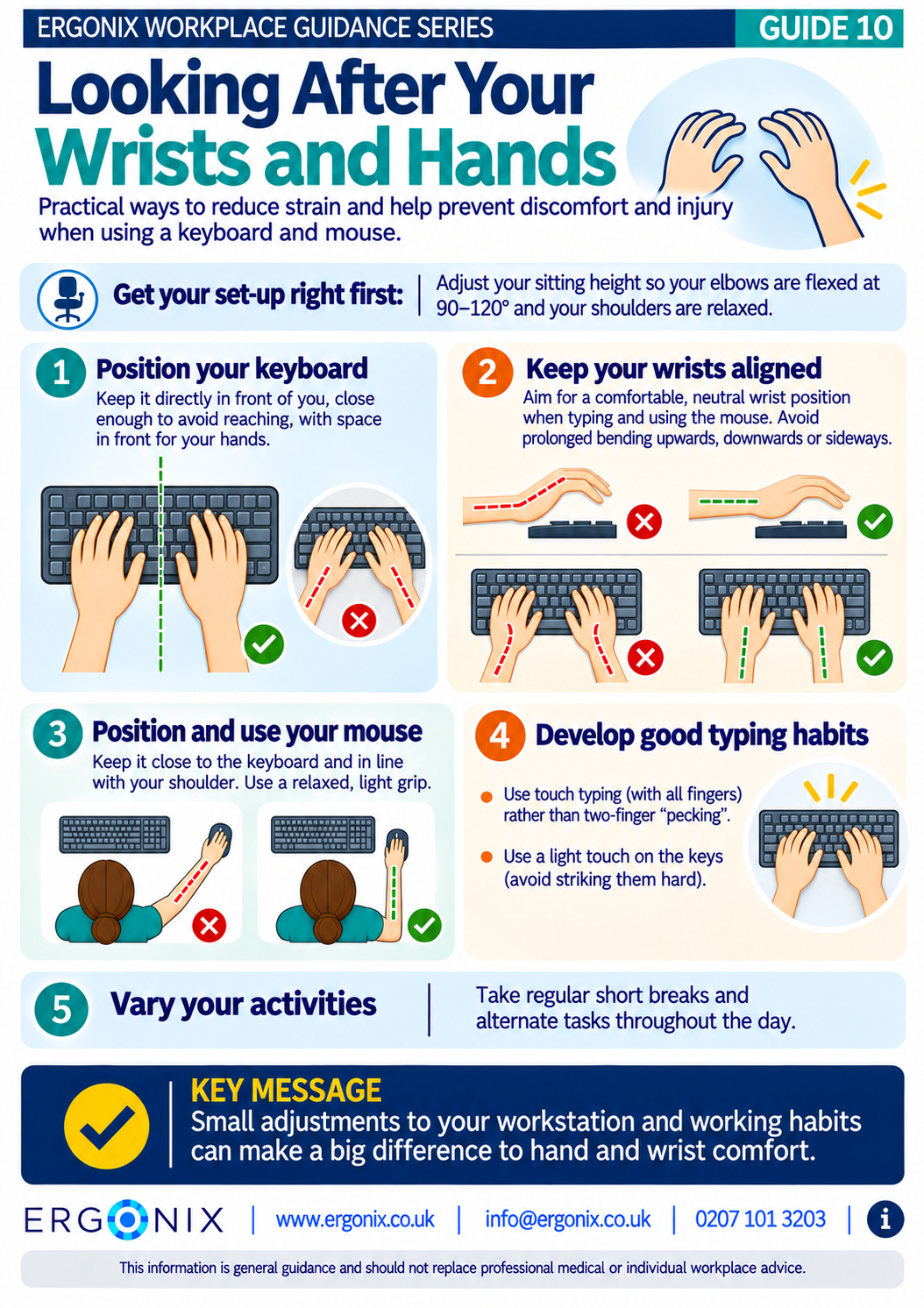
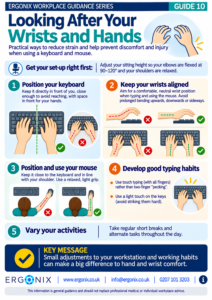
Adjust your sitting height: Position your chair so your elbows are flexed between 90° and 120°, with your shoulders relaxed. This helps maintain a comfortable arm position and reduces unnecessary tension in the shoulders, arms and wrists.
Position your keyboard: Keep it directly in front of you and close enough to avoid unnecessary reaching. This helps keep your arms comfortably positioned and reduces strain on the shoulders and upper limbs.
Keep your wrists aligned: Aim to keep your wrists in a comfortable, neutral position when typing and using the mouse. Avoid prolonged bending upwards, downwards or sideways, as these positions can increase strain on the muscles, tendons and other structures around the wrist, potentially leading to aches and pains.
Position your mouse correctly: Keep it close to the keyboard, with your arm relaxed and your elbow near your body. Avoid gripping the mouse tightly. This reduces unnecessary reaching and sustained muscle tension in the shoulder, forearm and hand.
Develop good typing habits: Learn to touch type rather than relying on two-finger typing. Using more fingers can distribute typing activity more evenly and improve speed and efficiency. Use a light touch on the keys rather than striking them forcefully, helping to reduce unnecessary muscle effort in the hands and forearms. Touch typing also reduces the need to repeatedly look down at the keyboard, helping to maintain a more comfortable head, neck and spinal position.
Vary your activities: Take regular short breaks and alternate tasks to avoid prolonged, repetitive hand and wrist movements. This gives the muscles and tendons opportunities to recover and helps reduce fatigue and discomfort.
Free Workplace Guidance
Download Guide 10 – Looking After Your Wrists and Hands (PDF)
Print and share within your organisation.
This free infographic provides practical advice on keyboard and mouse positioning, wrist alignment and working habits. It can be shared during DSE awareness training, employee inductions and workplace wellbeing initiatives.
Workplace Ergonomics and DSE Support
Ergonix supports organisations across the UK with specialist DSE workstation assessments, CIEHF-accredited DSE Workstation Assessor training and workplace wellbeing workshops.
Our CIEHF-accredited One-Day DSE Workstation Assessor Course provides practical training for HR professionals, health and safety teams and employees responsible for carrying out workplace DSE assessments.
Delivered by a Chartered Physiotherapist and ergonomics specialist, the course equips participants with the knowledge and practical skills to identify DSE risks, carry out workstation assessments and recommend appropriate adjustments. Find out more about our DSE Assessor Course and book your place here.
For more information about carpal tunnel syndrome, including symptoms, risk factors and workplace support, read our Preventing and Managing Carpal Tunnel Syndrome in the Office guidance.
In Summary
Small adjustments to your workstation and working habits can make a big difference to hand and wrist comfort.
Keep your wrists aligned, position your keyboard and mouse within easy reach, use a light touch and vary your activities throughout the day.
Explore More Free Workplace Guidance
Explore the Ergonix Workplace Guidance Series for more practical advice on DSE and workplace ergonomics.
- Guide 1 – Work Comfortably, Protect Your Spine
- Guide 2 – Move More, Feel Better, Perform Better
- Guide 3 – Using a Laptop Comfortably
- Guide 4 – Looking After Your Neck When Using Phones and Tablets
- Guide 5 – Looking After Your Eyes When Using Screens
- Guide 6 – Working Comfortably When Hot Desking
- Guide 7 – Working Comfortably With Screens While Travelling
- Guide 8 – Using a Sit-to-Stand Desk Effectively
- Guide 9 – What Makes a Good Office Chair?
- Guide 10 – Looking After Your Wrists and Hands (PDF)
References and Further Reading
Health and Safety Executive (HSE) – Working safely with display screen equipment
Arthritis UK -Carpal Tunnel Syndrome
Ergonix – Preventing and Managing Carpal Tunnel Syndrome in the Office
Ergonix – Do We Need Wrist Rests: A Guide to Typing Comfort
Ergonix – Touch Typing in the Workplace: How Employees and Employers Benefit
Ergonix – Move More The Benefits of Regular Movement for Employees and Employers
Author: Angela Yates | Workplace Health, Wellbeing & Ergonomics Specialist | HCPC-Registered Physiotherapist