 During our DSE Assessor Training Courses, one question comes up repeatedly:
“Can we just remove the armrests from office chairs?”
This is often raised when users report discomfort or difficulty adjusting armrests that feel too long, too wide, too high, or that prevent them from getting close to their workstation.
It is a very common DSE workstation assessment issue, particularly in office environments where standardised chairs are used across a workforce with different anthropometrics and job demands.
While removal may seem like a simple solution, the decision requires more ergonomic reasoning.
What are office chair armrests designed for?
Office chair armrests are designed to:
- Support the upper limbs during seated computer-based work
- Reduce muscular load through the shoulders and upper back
- Assist with postural stability during prolonged sitting
- Support safe and easier sit-to-stand transitions
When correctly adjusted, armrests can help reduce static load during keyboard and mouse tasks, particularly in office-based roles with prolonged screen use.
However, their effectiveness is entirely dependent on fit, adjustability, and workstation setup.
What are the common armrest problems in DSE assessments?
Poorly adjusted armrests may lead to:
- Elevated shoulders due to armrests being too high
- Abducted or “held away” arm positions due to excessive width
- Reduced desk access due to armrests being too long or fixed forward
- Forward leaning and slumped posture as the armrests are too long
- Uneven or asymmetrical arm support during mouse and keyboard use
These issues can contribute to upper limb discomfort, shoulder strain, back ache and increased postural load over time.
The key DSE principle: armrest fit, not armrest presence
Their value depends on whether they support a neutral seated posture, as arm support influences shoulder position, spinal alignment and overall postural load.
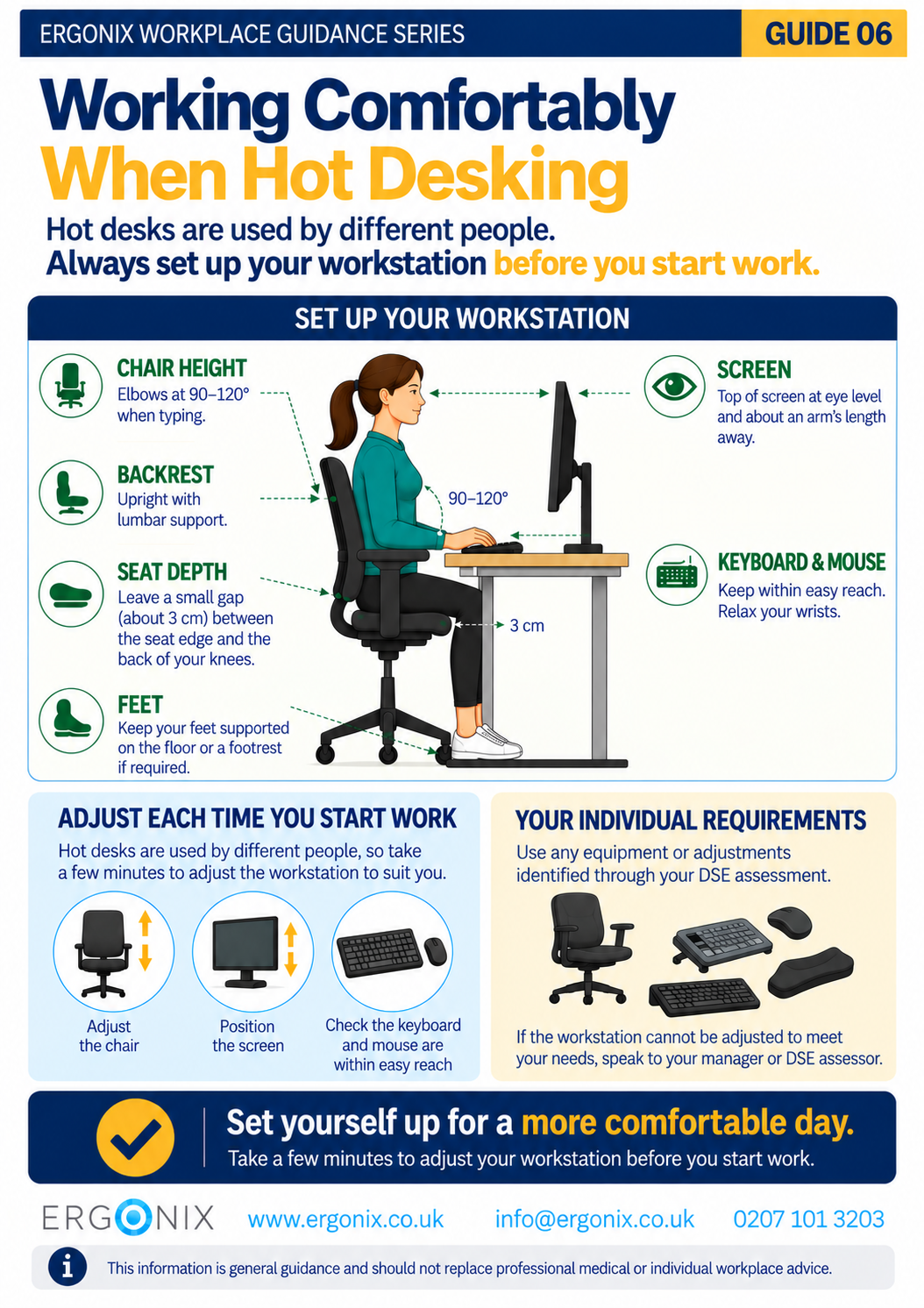
A suitable ergonomic setup typically allows:
- Shoulders relaxed (not elevated or pushed forward)
- Upper arms close to the torso
- Forearms supported without excessive pressure
- Sitting close to the desk without armrests restricting access or encouraging forward spinal flexion
- Easy access to keyboard and mouse without overreaching
If this cannot be achieved, the issue is the interaction between chair, user, desk height, and task requirements.
Should armrests be removed from office chairs?
During workstation assessments, removal of armrests is sometimes considered, but it should not be the default approach.
Before removal is recommended, DSE assessors should consider whether:
- armrests are incorrectly adjusted rather than unsuitable
- a different chair with better adjustability is available
- desk height or workstation layout is contributing to the issue
- the user benefits from upper limb support during tasks
- removal will negatively affect posture or comfort elsewhere
- the desk has sufficient surface area to support the forearms
In some cases, removal may be appropriate as a short-term or individual adjustment. However, in many situations, it simply removes a support function without addressing the root cause.
Office chair armrests and the workstation system
A key concept in workplace ergonomics and DSE workstation setup is that the chair does not function in isolation.
Changing or removing armrests affects the entire workstation relationship, including:
- Shoulder posture during keyboard and mouse use
- Distance between user and desk
- Elbow and wrist positioning
- Overall seated posture and spinal load distribution
This is why armrest decisions must always be considered as part of a full DSE workstation assessment, not as an isolated equipment change.
Practical guidance for DSE assessors
When assessing office chair armrests, a practical approach is recommended:
- Adjust other functions on the chair first to the user’s needs
- Assess whether armrests support a neutral upper limb posture during tasks
- Check adjustability (height, width, fore-aft and pivot adjustments where applicable)
- Observe interaction with desk height and workstation layout
- Identify whether discomfort is caused by poor adjustment or equipment mismatch
- Consider alternative chair options before removal
- Evaluate impact on keyboard and mouse use
Conclusion
Office chair armrests are one of the most frequently misunderstood elements in DSE workstation assessments.
They can provide meaningful support when correctly fitted and integrated into the workstation setup to the user’s needs. However, when poorly adjusted or mismatched to the user, they may contribute to discomfort and inefficient postures.
The key principle in workplace ergonomics is not whether armrests should be used or removed, but whether they are appropriately supporting the individual within their working environment and task demands.
In most cases, effective DSE assessment and workstation adjustment to the individual’s needs is more important than removing equipment altogether.
Frequently Asked Questions (DSE Armrests)
Should office chair armrests be removed in DSE assessments?
Armrests should not be removed automatically. The decision should be based on whether they support the individual’s neutral posture and allow appropriate access to the workstation.
Are armrests necessary for good workstation ergonomics?
Armrests are not essential for everyone, but they can provide useful support during keyboard and mouse use. Their effectiveness depends on fit, adjustability, and how they interact with the individual, the desk height and task requirements.
Can armrests cause shoulder or neck discomfort?
Yes, if they are poorly adjusted or incompatible with the individual and workstation setup. Common issues include elevated shoulders, restricted movement, or forward leaning to compensate for poor positioning.
What is better in most cases: adjusting or removing armrests?
Adjustment should always be considered first. Removal may be appropriate in specific cases, but it should not be the default solution, as it can remove useful support without addressing the underlying workstation issue.
Want to support employee health and improve workstation performance? Contact Ergonix to arrange DSE assessments, in-house DSE assessor training, or workplace wellbeing sessions tailored to your organisation.
By Angela Yates | Workplace Health, Wellbeing & Ergonomics Specialist | HCPC-Registered Physiotherapist